

![Atom 2. [Smart Remote.]](/assets/images/products/atom-2.png)
Media Controls
Control Music
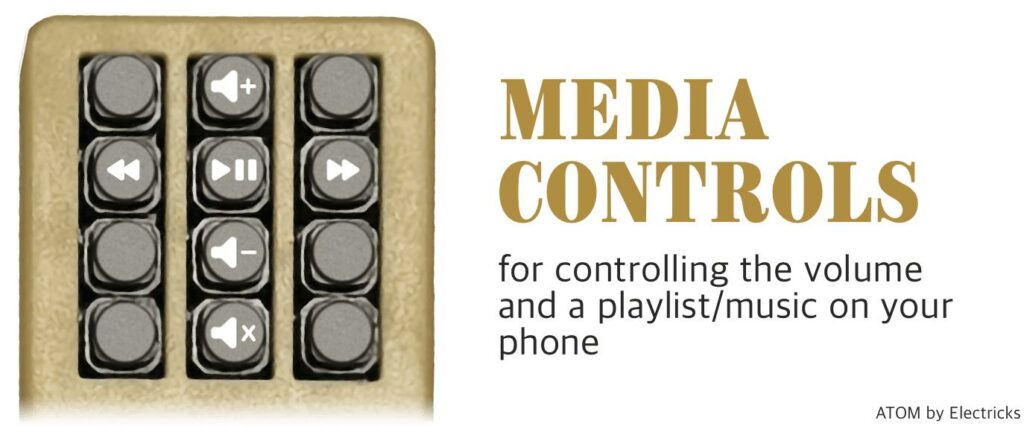
Launch this mini-app with button 10 (4th row-left).
With the Media Keyboard (button #10), you gain control over volume and music playback on your phone, compatible with various platforms including Spotify, Apple Music, and YouTube. For this to work, Atom must be paired with your phone as a Bluetooth Keyboard. All keyboard-related mini-apps require this pairing to function. Learn how to pair as a Bluetooth Keyboard or set up a Custom Keyboard. Furthermore, certain apps can detect volume up/down key presses, ensuring compatibility. For example, SB Mote and selfie remotes send volume-up signals, so apps supporting them should be compatible with this keyboard, too.
Special Features for Magicians
Volume Button Repetition
An important feature for performances is that if you keep pressing a button, it will repeat the presses. This can be useful for continuous effects or when you need multiple triggers of the same action.
Integration with Magic Apps
Many magic applications can detect volume up and down presses and allow you to assign custom actions to them. While our apps work better with Bluetooth connection (as they function even when the app is in the background), the media controls can serve as an excellent backup solution for other magic apps.
Playlist Navigation
During your show, you can seamlessly jump to the next playlist item without interrupting your performance. This is particularly useful when you need specific music cues for different tricks or acts.
Bone Conduction Devices
You can start playing recordings through bone conduction devices, which can be especially effective for mentalism performances where a magician can “plant” messages in a spectator’s mind, such as a reveal or prediction. The audience and magician don’t hear this audio, but the bone conduction device is held to the spectator’s head for a private message experience.