

![Atom 2. [Smart Remote.]](/assets/images/products/atom-2.png)
NOKIA Alphanumeric Keyboard
Enter Any Word Freely for Magic Performances
Launch this mini-app with button 8 (3rd row-middle).
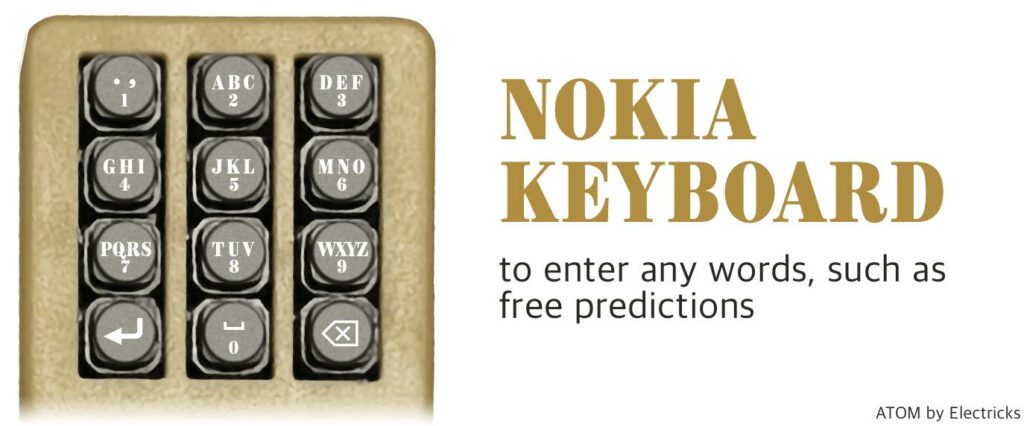
The NOKIA Keyboard (button #8) embraces the iconic layout synonymous with NOKIA phones. For magicians, this keyboard is particularly useful for entering text in apps during performances, such as words chosen by spectators, names of people or objects, or any other text needed for your routines. All keyboard-related mini-apps require Atom to be paired with your phone as a Bluetooth Keyboard to function. Learn how to pair as a Bluetooth Keyboard.
For instance, to type the letter “E”, press the third button twice, as illustrated in the provided photo.
For example, to enter “duck”, press button 3 once, button 8 twice (quickly, like a double-click with a mouse), button 2 three-times, button 5 twice.
Magician Applications
The NOKIA Alphanumeric Keyboard allows you to freely enter text in apps during performances, making it ideal for:
- Entering words selected by spectators in mentalism routines
- Typing names of people or objects suggested by the audience
- Inputting predictions or reveals in real-time
- Creating personalized experiences based on audience participation
This keyboard gives you the flexibility to enter any text needed for your performance without pre-programming specific words or phrases.